

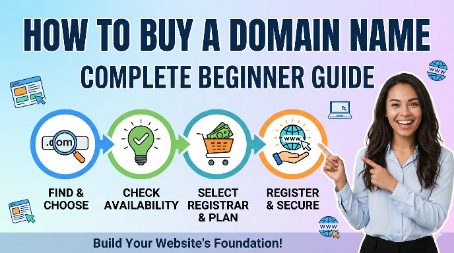
A domain name is the foundation of your online identity. Whether you want to start a blog, business website, portfolio, or e-commerce store, choosing and buying the right domain name is the first and most important step. A good domain not only builds trust but also helps in branding and SEO ranking.
In this guide, you will learn how to buy a domain name step-by-step in a simple and beginner-friendly way.
1. Understand What a Domain Name Is
A domain name is your website address on the internet, like example.com. It replaces complex IP addresses and makes it easy for users to find your website.
For example:
Google.com
Amazon.com
YourBusinessName.com
– A domain represents your brand online.
2. Choose the Right Domain Name
Before buying, selecting the right name is very important.
✔ Tips for choosing a good domain:
– Keep it short and simple
– Avoid numbers and hyphens
– Use easy-to-spell words
– Make it relevant to your niche
– Prefer “.com” extension if available
– A memorable domain helps users return easily.
लैपटॉप खरीदने से पहले सही जानकारी होना जरूरी है, इसके लिए आप हमारी यह गाइड भी पढ़ सकते हैं – लैपटॉप खरीदने की पूरी गाइड 2026
3. Check Domain Availability
Once you decide the name, check whether it is available or not.
You can use domain search tools on websites like:
– GoDaddy
– Namecheap
– Hostinger
– Google Domains (limited regions)
– If your name is taken, try variations or different extensions like .net, .org, .in etc.
4. Compare Prices Before Buying
Domain prices vary depending on the provider and extension.
.com domains are usually more expensive
New extensions (.online, .site) may be cheaper
– Always compare prices before purchase to get the best deal.
5. Buy Domain from a Trusted Registrar
A domain registrar is a company that sells domain names.
Popular registrars:
– GoDaddy
– Namecheap
– Hostinger
– BigRock
Steps to buy:
– Search your domain name
– Select available option
– Add to cart
– Complete payment
– Verify email
– After purchase, the domain is yours for a selected period (usually 1 year or more).
6. Enable Domain Privacy Protection
When you buy a domain, your personal details are stored publicly in WHOIS database.
Domain privacy protection hides your personal information like name, email, and phone number.
This helps prevent spam and unwanted contact.
7. Connect Domain to Hosting
A domain alone does not create a website. You also need hosting.
Steps:
– Buy hosting service
– Connect domain to hosting server
– Install website (WordPress or other CMS)
– Now your website becomes live.
Cut Your Car Insurance Costs: Smart Ways to Get Maximum Coverage for Less
8. Renew Your Domain on Time
Domains are not lifetime purchases. You must renew them yearly.
If you forget renewal, your domain may expire and someone else can buy it.
Buying a domain name is a simple but crucial step in building your online presence. A good domain name improves branding, trust, and SEO performance. By choosing a short, relevant, and easy-to-remember name, you can create a strong foundation for your website.
Take your time, compare options, and choose wisely—because your domain is your digital identity.